

If you have developed or deployed Actuate 8 reports for Maximo 6, you have undoubtedly encountered this error many times. The problem is usually due to the fact that there is a connection problem to the database and it is the user account name that is causing this error. So when you try to run a report whether it be from e.Report designer or from Maximo the error you get is as follows:
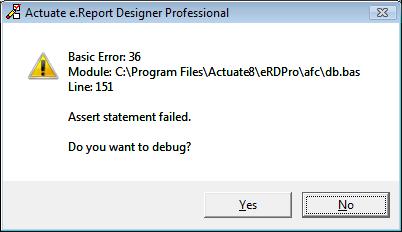
This error doesn’t explain much as to why it’s happening and can be troublesome to fix. First and foremost, I would try to resolve this issue within e.Report designer before publishing it to your report server.
Before an Actuate report runs, it needs to be able to access the database with a valid username and password. This user account needs to have the right permissions to execute queries and so forth in SQL Server. The default user account for running reports is ‘MAXIMO’ so we will use that. Some of you may or may not use this account but whatever username you create for running your reports needs to be in upper case. This is very important. If you create a username in anything other that upper case, you will recieve this Actuate error. I think this the part that most people miss when running reports. Next, the ‘MAXIMO’ account needs to have permissions to execute queries. You can set this account to dbo owner running this command:
EXEC sp_changedbowner 'MAXIMO'
Once you have created a valid username and given it the right permissions, you should no longer be getting this error message while you are in e.Report designer running your report.
Now when you go to deploy your report on the server and still getting this error, you need to modify the maximo.properties file. I will assume that you have already created a valid ODBC on the report server that connects to your database and set the property to this:
// Actuate database connection string.
mxe.report.actuate.db.connectstring=max6
where ‘max6’ is the name of your ODBC. Go to your rsse_maximo.properties file and ensure that the username is in upper case and of course you need to rebuild ears and redeploy once you make changes.
For more information and for Oracle databases, read this IBM KB article here.
UPDATE: If you are using SQL Server, do not use the ‘sa’ user to try and connect to the database. This will also give you the same error.



I have a question:
eRD PRO is not connecting to the database. And when I tried, I got an error message:
Could not load library: C:ProgramFilesActuate8eRDProbinacorcl81.dll. Its version might be incompatible with your database client version.
I have Maximo 6.2.3, Actuate 8, Oracle 10g
Any ideas on how to resolve this issue?
Thank you so much,
AJ
Hi AJ, you are using acorcl81.dll which is for Oracle 8. Try using acorcl90.dll which works with Oracle 9i and 10g.
Please if you can explain how to configure it to use oracle 9i driver?
Thanks
Igor
I don’t remember off the top of my head, but I believe you have to change your connection library to use the oracle one. You have to go to Tools->Library Organizer and change your MaximoDataComponents to use the oracle version. You should also change your global search path to point to Actuate’s oracle library.
Would like to ask if you know how to allow more than 10 parameters in the Report Request Page in Maximo 6 (Actuate 8)? It reflects as “Invalid Binding” for the parameters after the 10th parameter. Thanks in advance for any suggestions!
You aren’t the only one that has asked me that question. I have never had to write a report with that many parameters, so I can’t really say exactly.
Hi Chon,
Would like to ask if you have seen this error before?
“Status No 1: Basic Error: 36 Module: afcdynamictext.bas Line 1168: Assert Statement failed.”
Cheers,
Genevieve
Sorry, I have not seen that .bas file before.
I am receiving this error, any suggestions
Could not load library: C:ProgramFilesActuate8eRDProbinacorcl81.dll. Its version might be incompatible with your database client version.
I have Maximo 6.2.3, Actuate 8,SQL Server.
If you are using Oracle 10g, this version might not be compatible. If you are using SQL, then you need to use a different DLL. Double check your default libraries and make sure you are using the ones for SQL server and not Oracle.
We are currently using SQL Server. Where do I get the DLL file.
Thanks
Are you getting this error during runtime or during develop of the report?
Dear Chon
I am receiving the same error above even i have did and insure all the steps you have mentioned here. i am using SQL server 2008 with maximo version 6.2 – SQL clustered in the shape (SQL clustered nameinstance name)..any suggestion