

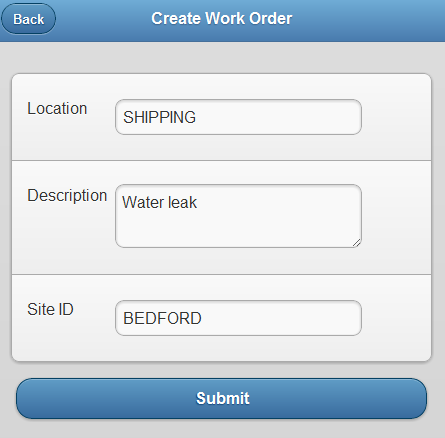
We already have a login page to authenticate users, so now the first action we want to implement is a way for users to create a new work order. This is a very basic form with just a few fields, but you can always add your own fields to fit your needs. You can enter a location, site ID and a description for the work order and submit it thru the REST API. Once the work order is created, you can then view the details of that work order.
Here is full sample source code for creating a new work order. This includes part 1 of this series with the login page for authentication. Read the end of part 1 to see how to run this application. Let me know what you think…
<!DOCTYPE html> <html> <head> <meta charset="utf-8" /> <meta name="viewport" content="width=device-width, initial-scale=1" /> <title> </title> <link rel="stylesheet" href="http://code.jquery.com/mobile/1.1.0/jquery.mobile-1.1.0.min.css" /> <style> /* App custom styles */ </style> <script src="http://ajax.googleapis.com/ajax/libs/jquery/1.6.4/jquery.min.js"> </script> <script src="http://code.jquery.com/mobile/1.1.0/jquery.mobile-1.1.0.min.js"> </script> </head> <body> <!-- Login Page --> <div data-role="page" data-theme="b" id="Login"> <div data-theme="b" data-role="header"> <h3> Login </h3> </div> <div data-role="content"> <form data-ajax="false" id="loginForm" action="http://192.168.2.42/maxrest/rest/mbo/MAXUSER?_format=json&_compact=1"> <ul data-role="listview" data-divider-theme="b" data-inset="true"> <li> <div data-role="fieldcontain"> <fieldset data-role="controlgroup"> <label for="_lid"> User Id </label> <input id="_lid" placeholder="" value="" type="text" /> </fieldset> </div> </li> <li> <div data-role="fieldcontain"> <fieldset data-role="controlgroup"> <label for="_lpwd"> Password </label> <input id="_lpwd" placeholder="" value="" type="password" /> </fieldset> </div> </li> </ul> <input type="submit" value="Submit" /> </form> </div> <script type="text/javascript"> //App custom javascript $('#loginForm').live('submit', function (e) { //prevent the default submission of the form e.preventDefault(); var url = $(this).attr('action') + "&_lid=" + $('#_lid').val() + "&_lpwd=" + $('#_lpwd').val(); $.mobile.showPageLoadingMsg(); $.ajax({ type: 'GET', url: url, success: function(xhr, e, s){ $.mobile.changePage($('#Main')); console.log(xhr); }, error: function(xhr, e, s){ $.mobile.hidePageLoadingMsg(); if (xhr.status == 400 || xhr.status == 401){ //BMXAA0021E - User Id and Password is invalid alert('Invalid username and password'); } else { alert('Unknown Error'); } } }); }); </script> </div> <!-- Main Menu Page --> <div data-role="page" data-theme="b" id="Main"> <div data-theme="b" data-role="header"> <h3> Main </h3> </div> <div data-role="content"> <ul data-role="listview" data-divider-theme="b" data-inset="true"> <li data-role="list-divider" role="heading"> Menu </li> <li data-theme="c"> <a href="#CreateWO" data-dom-cache="false" data-transition="slide"> Create New Work Order </a> </li> </ul> </div> </div> <!-- Create Workorder Page --> <div data-role="page" data-theme="b" id="CreateWO" data-dom-cache="false"> <div data-theme="b" data-role="header"> <a href="#Main" data-rel="back" data-role="button">Back</a> <h3> Create Work Order </h3> </div> <div data-role="content"> <form data-ajax="false" id="createWOForm" action="http://192.168.2.42/maxrest/rest/os/MXWO?_format=json&_compact=1" method="POST"> <ul data-role="listview" data-divider-theme="b" data-inset="true"> <li data-theme="c"> <div data-role="fieldcontain"> <label for="location">Location</label> <input id="location" name="LOCATION" type="text"/> </div> </li> <li data-theme="c"> <div data-role="fieldcontain"> <label for="description">Description</label> <textarea id="description" name="DESCRIPTION" maxlength="100"></textarea> </div> </li> <li data-theme="c"> <div data-role="fieldcontain"> <label for="siteid">Site ID</label> <input id="siteid" name="SITEID" type="text" value="BEDFORD"/> </div> </li> </ul> <input type="submit" value="Submit" /> </form> </div> <script type="text/javascript"> //App custom javascript $('#createWOForm').live('submit', function (e) { //prevent the default submission of the form e.preventDefault(); var formData = $("#createWOForm").serialize(); var url = $(this).attr('action'); $.mobile.showPageLoadingMsg(); $.ajax({ type: 'POST', url: url, cache: false, data: formData, dataType: 'json', success: function(xhr, e, s){ console.log(xhr); if (xhr.CreateMXWOResponse.MXWOSet.WORKORDER){ var wo = xhr.CreateMXWOResponse.MXWOSet.WORKORDER; //alert("Work Order # : " + wo.WONUM + " Created"); $.mobile.changePage($('#WODetails')); $('#WODetails #wonum').val(wo.WONUM); $('#WODetails #location').val(wo.LOCATION); $('#WODetails #description').val(wo.DESCRIPTION); $('#WODetails #status').val(wo.STATUS); $('#WODetails #siteid').val(wo.SITEID); } else { $.mobile.hidePageLoadingMsg(); alert('Error - ' + xhr.responseText); } }, error: function(xhr, e, s){ $.mobile.hidePageLoadingMsg(); if (xhr.status == 400 || xhr.status == 401){ alert('Error'); } else { alert('Unknown Error'); } } }); }); </script> </div> <!-- Workorder Details Page --> <div data-role="page" data-theme="b" id="WODetails" data-dom-cache="false"> <div data-theme="b" data-role="header"> <a href="#Main" data-role="button">Back</a> <h3> Work Order Details </h3> </div> <div data-role="content"> <ul data-role="listview" data-divider-theme="b" data-inset="true"> <li data-theme="c"> <div data-role="fieldcontain"> <label for="wonum">Work Order #</label> <input id="wonum" name="WONUM" type="text"/> </div> </li> <li data-theme="c"> <div data-role="fieldcontain"> <label for="location">Location</label> <input id="location" name="LOCATION" type="text"/> </div> </li> <li data-theme="c"> <div data-role="fieldcontain"> <label for="description">Description</label> <textarea id="description" name="DESCRIPTION" maxlength="100"></textarea> </div> </li> <li data-theme="c"> <div data-role="fieldcontain"> <label for="status">Status</label> <input id="status" name="SITEID" type="text"/> </div> </li> <li data-theme="c"> <div data-role="fieldcontain"> <label for="siteid">Site ID</label> <input id="siteid" name="SITEID" type="text" value="BEDFORD"/> </div> </li> </ul> </div> </div> </body> </html> 


0 thoughts on “Build a lightweight mobile framework for Maximo: Create a Work Order”