

The workorder assignment manager already has a built in color code scheme where it changes the font color of the rows depending on what the priority of the workorder is. We can expand this functionality to other modules as well such as the Workorder Tracking module. We can change the row color of each workorder depending on what status it is in or what priority it ranges from. Here is a screenie of what the we are trying to achieve for the end result.
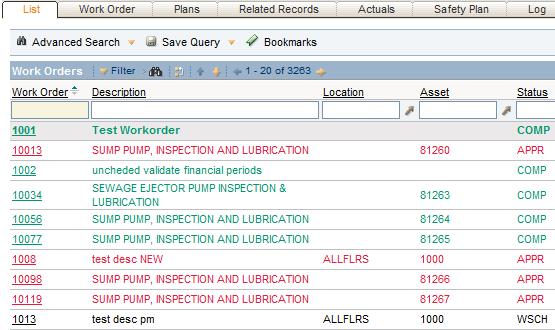
So in order to color code these workorder by status type you will have to go and modify the XML file found in the Application Designer.
First, open up the Application Designer and open the WOTRACK module. From there, export the XML file and save it to your desktop. Open up the file in notepad or your favorite XML editor, and search for this:
<tab id="results" default="true" label="List" type="list">
This is the tab that contains the table for the workorder list. Now add the following snippet just before the </tablebody>:
<displayrule id="exactrule1" dataattribute="status">
 <exact id="exact1" value="APPR" classname="rowcolor_calcpriority_2" />
 <exact id="exact2" value="WAPPR" classname="rowcolor_calcpriority_4" />
 <exact id="exact3" value="COMP" classname="rowcolor_calcpriority_6" />
 <exact id="eaxct5" value="INPRG" classname="rowcolor_calcpriority_9" />
</displayrule>
You have now added a display rule that tells Maximo for all workorder status’ that are in APPR, WAPPR, COMP, or INPRG, add a color code accordingly. The ‘classname’ attribute specifies what CSS class it will use for the color. These CSS classes are predefined and you can look them up in the maximo.css file located at “ibm/SMP/maximo/applications/maximo/maximouiweb/webmodule/webclient/css”.
After you have saved your changes, import the modified XML file back into Application designer and save. Now go check out the cool new color scheme.
Now, this display rule works with exact values but what if you wanted to do a range of values such as workorder priority? You can do that as well. Add the following code to do just that…
<displayrule id="displayrule1" dataattribute="wopriority">
 <range id="range1" lower="0" upper="2" classname="rowcolor_calcpriority_2" />
 <range id="range2" lower="3" upper="4" classname="rowcolor_calcpriority_4" />
 <range id="range3" lower="5" upper="6" classname="rowcolor_calcpriority_6" />
 <range id="range4" lower="7" upper="8" classname="rowcolor_calcpriority_8" />
 <range id="range5" lower="9" upper="9" classname="rowcolor_calcpriority_9" />
</displayrule>
Update: Here is an extract of the maximo.css file with the color codes:
/* workman */
 .rowcolor_calcpriority_0 {color:RGB(226, 29, 64);}
 .rowcolor_calcpriority_2 {color:RGB(226, 29, 64);}
 .rowcolor_calcpriority_4 {color:RGB(255, 190, 0);}
 .rowcolor_calcpriority_6{color:RGB(0, 150, 112);}
 .rowcolor_calcpriority_8{color:RGB(0, 0, 255);}
 .rowcolor_calcpriority_9{color:RGB(183, 128, 191);}
 .rowcolor_percentalloc_0_50{color:RGB(226, 29, 64);}
 .rowcolor_percentalloc_51_80{color:RGB(255, 190, 0);}
 .rowcolor_percentalloc_81_100{color:RGB(0, 150, 112);}
After you’ve done this, you can also add color codes to labels while your in the XML.
Enjoy!



This is pretty useful. The example here shows status on workorder; you can use multiple rules, I tried using status and team code on the incident app. If you have overlap, the high (first) rule will win.
Too bad the portlets aren’t this flexible, and I haven’t figured out how to set colour based on validation. E.g. highlight in red the items which are priority customers, or SLA breached. Kinda new to this though.
I can’t get this to work. I’ve inserted the dispayrule code as requested, but no color on my list results. Below is my code… Can you take a look to see what I might be doing wrong? We’re using version 7.1.1.4, our maximo.css file has the some color codes.
Have you tried restarting your application server once you made the changes?
good,this is good thing!
This is cool for adding colour to the labels but how do I get the text inside the field to be a different colour?
This is really cool. Thanks for sharing.
Maximo6.2.1 support this feature? Try the 6.2.1 version I was not successful.
I don’t think it does. I have never tried.
Can you add fields on the list module? Can you add fields that are totals on the list module? Like the total labor hours for each work order.