

- Import data with Maximo Integration Framework (MIF)
- Import/Export data with MxLoader by Bruno Portaluri
- Import labor codes with Maximo Integration Framework
- Import users security groups with MIF
- Import Inventory Records using Maximo Integration Framework (MIF)
- Exporting data to XML with MIF event listener for any changes on an object automatically
- Import asset classification hierarchies and classification attributes with MIF
- Import PM’s and PM sequences with Maximo Integration Framework (MIF)
- Import locations with Maximo Integration Framework
- How to import failure codes with the Maximo Integration Framework (MIF)
- Create a Person Group object structure and web services with MIF
- Screencast: Import data with XML flat files
- Export data to XML files with MIF
- Screencast: Import users and passwords with Maximo Integration Framework
- Import assets and asset specifications with MIF
Most of the tutorials that we have done so far have been for integrating with Maximo by importing or updating data, but sometimes you may need to work the other way around and integrate with third party applications from Maximo by exporting data. I have already shown you how to export data to XML manually, but this tutorial will show you how to set it up automatically in Maximo 7. This serves two benefits. It doesn’t require human interaction when any changes are made to an object, such as an asset in Maximo, and it exports the changed data to XML for a third party application to pick up and process.
If you haven’t read the post on how to do it manually, then skim over real quick to get a brief understanding of what we are trying to do. Before we begin, make sure that you have setup your MIF global directory in your System Properties. If you haven’t done so, find the property name ‘mxe.int.globaldir’ and set it to something like ‘C:\mif-globaldir’.
Next, we will use an out of the box Object Structure and Publish Channel. You can always create your own, but for simplicity sake, we can use the existing one. First Go To -> Integration -> Publish Channels and find the ‘MXASSETInterface’. Open it and click Select Action -> Enable Event Listener. This will set the ‘Enable Listener?’ check box. This enables MIF so that whenever we make a change to an object in the MXASSET object structure, it will export the data to whatever format we specify. In our case, it’ll be XML but you can export it to a flatfile (.dat) if you want.
Now we will use the out of the box External System. Go To -> Integration -> External Systems and click on EXTSYS1. If you have been following all of our tutorials and using a different external system, then you can use that. First, double check to make sure that the ‘Outbound Sequential Queue’, ‘Inbound Sequential Queue’, and the ‘Inbound Continuous Queue’ values are set to the right JMS queues. If not, you can always check this post. Since we are exporting to XML, we need to make sure the ‘End Point’ is set to ‘MXXMLFILE’. Check the ‘Enabled?’ box and save. It should look something like this:
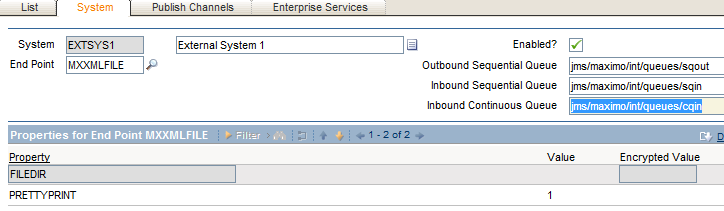
Next, click on the ‘Publish Channels’ tab, and add the MXASSETInterface to this list if it isn’t there already. Check the box to enable this interface and save.
Now everything is setup to export data changes automatically. Go into the Asset module and change an asset’s description to something different and save. Once it is saved, go into your MIF global directory, you should see a ‘xmlfiles’ directory, open that and there should now be an XML file in there. If it’s not there, wait a few minutes for the queue to process it. If you open this file in notepad, you may notice that the formatting is not what you expected in terms of an XML. This is because your PRETTYPRINT property may be set to zero, so that basically means that this file isn’t really human readable which is fine when your third party application is processing it. To make it human readable, you can set the PRETTYPRINT value to 1. You can read my previous post on how to do just that.
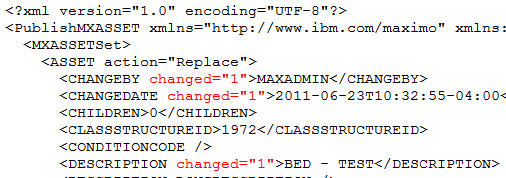
Also, another important piece of information in this XML data export is the “changed” attribute. To find out what fields were actually changed that triggered this data export, the field has an attribute called “changed” and it is set to 1 to signify that that value has changed.



Using this process, is it possible to have a second Maximo system get these exported messages and update its own records? We have the need to keep 2 sites (one from 1 Maximo system and 1 from different Maximo) synchronized in real-time.