

In Maximo 4.1.1, you used to be able to select a laborcode or craft on a workorder. Now in Maximo 6 and 7, you can’t even select either one. You now have to select a person ID for the lead field on the workorder. I am not completely sure why IBM got rid of that functionality all together, because most of our clients still assign workorders to a craft instead of just one person. The supervisor of that craft will then disperse the workorders to his laborers.
If you want to still be able to assign to a craft, you would have to customize the MBO’s (which is out of the scope of this tutorial) in order to do that, but this tip just simply displays a read only field for the default craft of the person you select in the lead field of the workorder. This is a screenie of what we are trying to achieve.
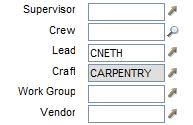
Now this effect is easy to achieve, but keep in mind that when you save this workorder, that craft value is NOT saved in the database or anywhere else. This simply displays the selected lead persons craft for informational purposes only.
In order to make this happen, we need to setup a new relationship on the workorder object. To better understand relationships, you can go into the Database Configuration help section. The helps states this about relationships:
You use the Relationships tab to define SQL for JOINS, so you can create relationships between parent and child tables. A JOIN lets you link together data from multiple tables, and in the system the Parent is the table you already have and Child is the one you’re trying to get.
So for example, Parent = MAXUSER, Child = SITE, and Name = DEFSITE means you have maxuser and want to get the site for the user’s default site, as following:
siteid = :defsite
This means site.siteid = maxuser.defsite. When the SQL gets executed, anything preceded by a colon is substituted with the value of that attribute from the parent.
So to setup our relationship, first go to System Configuration -> Platform Configuration -> Database Configuration and find the WORKORDER object. Click on the “Relationships” tab and click “New Row”. For the “Relationship” field, lets call it “DEFAULTLABORCRAFT”. This is the name we will be using later in the application designer in order to show the craft value. For the “Child Object”, enter “LABORCRAFTRATE”. Now for the “Where Clause” we are gonna enter:
laborcode = (select laborcode from labor where personid = :lead)
and orgid = : orgid and defaultcraft = 1
I won’t go into great detail, but this where clause gets the default craft of the person selected in the lead field. Now save the record and go into the application designer.
Once you are in the designer, open the WOTRACK module and search for the section found in the image above which can be found in the Work Order tab. Copy the lead field and paste it in the same section. Open the properties dialog for the copied field and enter the following fields.
- Attribute: DEFAULTLABORCRAFT.CRAFT
- Menu Type: NORMAL
- Input Mode: Readonly
Save your changes and now go into the workorder module. Create a new workorder or open an existing one and now assign the lead field to a person. If that person is assigned a laborcode and a default craft, it will show in the field we just created.


