

As you guys may know, I am a .NET developer and I have been experimenting with Java and trying to learn and write some Maximo custom java class implementations. So here is my first hands on experience extending an existing class in order to add a laborcode field to the workorder screen. Of course, you could just go into the database configuration and just add a new field and associate it with the labor object, but there is more to it than just adding a new field. If you want that field to behave like other laborcode fields, such as the lookup dialog to show the right data, or making sure that the value entered into the field is validated against the existing laborcodes. If you didn’t write this custom java class, the user could just enter any data they wanted and it wouldn’t be validated against the laborcodes and it would defeat the purpose of adding it in the first place.
I had to write this java class because one of my clients requested that they wanted to be able to put a laborcode value directly on the workorder screen, just like they were able to in Maximo 4.1.1, even though they could just add a record into the Work Plan tab of the workorder. But now in Maximo 7, the lead or supervisor field is associated with the person table and not labor table. And since their person ID’s are not that same as their labor code ID’s, I have come up with this simple solution. This tutorial will walk you through adding a new field in the database configuration and setting it up to use the custom java class that we have written. The java source is also provided here.
First, download the source files:
[wp_eStore_free_download_ajax:product_id:3:end]
This contains the .java class and the compiled .class file that will be associated with the new field we create. Copy the contents of the bin folder into the [maximo]\applications\maximo\businessobjects\classes folder. This folder should now consist of three directories: “com”, “psdi”, and “interpro”. Now you will need to rebuild and deploy your maximo.ear file.
Second, we will need to add a new field to the workorder object. In our case, the field name will be called ASSIGNEDLABOR. So you want to go into the Database Configuration and open the WORKORDER object. Go into the Attributes tab and add a new row. The settings should look like the picture below:
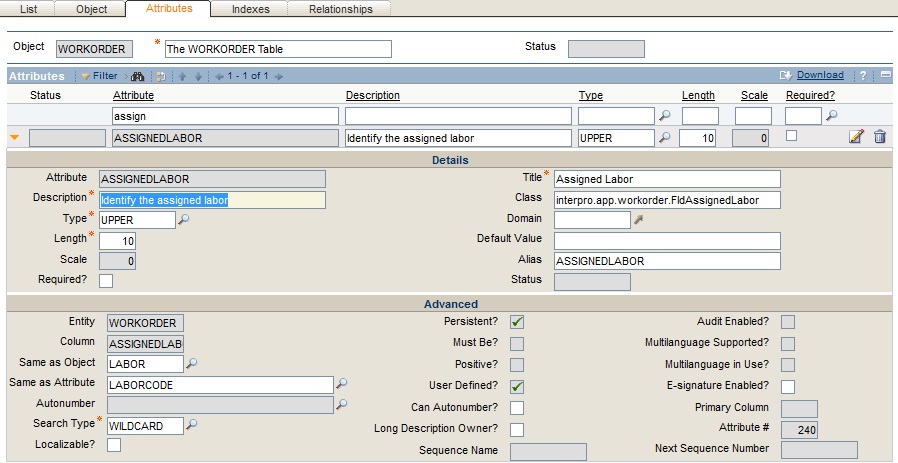
So for a quick walk through of what these setting are, the Attribute field is the name you want to be, in our case ASSIGNEDLABOR. The Type is UPPER and the Length is 10 because these are the values that are used by the laborcode field in the labor object. Title is the default name that will appear on the workorder screen when you add a new field within the Application Designer. Class is the name of the custom class that we wrote for this field. And finally, you want to make sure that the Same as Object is set to LABOR and the Same as Attribute is set to LABORCODE. Also make the Search Type a WILDCARD search.
Now that is done, make sure you save changes and apply your configuration changes to the database by turning on Admin Mode proceeding from there.
Once your changes have been made, you can now go into the Application Designer and add a new field to the workorder screen. When you add a new field, the textbox properties should look like the following:
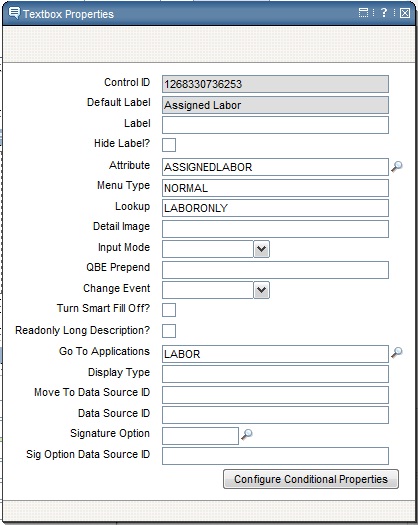
Now save your changes and go ahead and play around with your new field.



You can also put Table domain on a field and then you can use lookup and other functionality. In table domain you can also specify validation where clause and a fileter clause for lookup.
Hi chon,
I am facing some problem to map object attributes with application control. Please go thru the details
i have created one table laborjob thru database configuration application in maximo and i have added(designed) tab in asset application, when i map the control(text box) with table attribute its showing me error “INVALID BINDING”
i have given service as ASSET to that table and class is custom class psdi.mbo.custom.CustomMboset.
there is 11 attribute of table in which siteid and assetnum is same as object site and asset. so these attribute are got mapped easily but other independent attribute which i have created showing the invalid binding error
what should be the relationship i should create in both table, i have set the child object as ASSET and where clause as assetnum=:assetnum and siteid=:siteid
thanks
janhavi
I am new to customizations. Could you let me know the steps to create an ear file and redeploy. I am using v7.2. Thanks