

An iframe control can be useful in many ways to add extra functionality to your existing Maximo implementation. You can use this method to host our EZDash solution. This little tip on how to create an iframe control in Maximo doesn’t involve any custom java code to be written. It’s actually quite easy to create and it uses an existing control.
First go to the Application Designer, find the application you want to modify. Let’s say the Workorder module, so open up WOTRACK. To keep things simple, lets add a new tab that will contain our iframe control. Open up the Control Palette dialog and click and drag a new Tab control and add it to the end of the existing Tab Group, right next to Specifications. Now that you’ve added it, click on the tab to select it. It should now be empty, so we can now add a new Section control. Click and drag it to the appropriate area. Once you’ve done that, right click on the section control and view it’s properties. Check the “Show Border?” option and enter this into the description box:
<iframe id="frame1" name="frame" width="100%" height="600" src="http://www.google.com"></iframe>
It should now look like this:
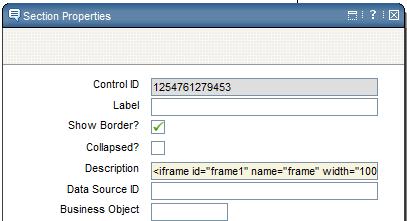
As soon as you close the dialog box, the iframe should now show and google.com will be the page displayed. Save your changes and now go to the Work Order Tracking application and click on the new tab to see your custom iframe control in action.



Hello .
Can you please help me:
I’m trying to get workng this example… In Application Designer everything seems to be ok – I can see google.com , but when I open my new tab in application(ASSETS) there shows Start Center page(incomplete) in my iframe. Websphere SystemOut.log:
http://www.yousendit.com/transfer.php?action=batch_download&batch_id=TzY0T0NYQzNsMHdLSkE9PQ
I have a similar issue. The problem seems to be that the final URL somehow gets concatenated with a root maximo url and the result is:
http://servername/maximo/ui/“http://www.google.com”. How can this be fixed? Anyone please?
To the writer of this article: did you get the Google page properly in the application ? (instead of the problem as described in the response above)
Yes I got it working with the google page.
I got the same problem i change dthe frame number but still same issue any resolution as yet
It worked for me. Thank you Chon.
Has anyone found the solution for not working iframe in real app while working in Application Designer? In Application Designer i.e. google displays properly, but in the application instead of google i have got the main page of Maximo because of wrong url. Instead of google.com, i’ve got …maximo/google.com
Yes, I found the solution. I have posted the solution on my blog at http://www.maximonews.com
Search by using keyword as “iFrame Problem”
Regards
You have found a solution for this?
How Can I use Object variable into src (url) for this frame example?
for example http://www.google.com&search={ASSET.DESCRIPTION}
You can use the Launch in Context feature
Chon, you mention using a Launch In Context to bring object attributes into the iframe’s src property, but I’ve been unable to get this to work. I made an LIC entry with the URL to my external app, added a sigoption to the Locations app and associated the LIC entry with it, and then I’m stuck. The section control doesn’t have an event property, but I added the sigoption in the Advanced properties tab. Then I added the {LOCATION} attribute as a URL parameter in the src property, but only the literal string {LOCATION} is being passed. What am I missing? Thanks.
You have found a solution for this?
any reply?