

- Import data with Maximo Integration Framework (MIF)
- Import/Export data with MxLoader by Bruno Portaluri
- Import labor codes with Maximo Integration Framework
- Import users security groups with MIF
- Import Inventory Records using Maximo Integration Framework (MIF)
- Exporting data to XML with MIF event listener for any changes on an object automatically
- Import asset classification hierarchies and classification attributes with MIF
- Import PM’s and PM sequences with Maximo Integration Framework (MIF)
- Import locations with Maximo Integration Framework
- How to import failure codes with the Maximo Integration Framework (MIF)
- Create a Person Group object structure and web services with MIF
- Screencast: Import data with XML flat files
- Export data to XML files with MIF
- Screencast: Import users and passwords with Maximo Integration Framework
- Import assets and asset specifications with MIF
Exporting data with the Integration Framework is a lot easier than importing data. When importing data, we use “Enterprise Services”, but for exporting data we need to use “Publish Channels”. Of course they are both based on Object Structures. Out of the box, Maximo provides plenty of Publish Channels and Enterprise Services to satisfy most of our needs. So for this tutorial, I will show you how to export ITEMS to an XML file.
What you will learn:
- Setup integration framework global directory
- Export data to XML file
- Export data that is formatted correctly (readable)
Before we begin exporting data, we need to specify the global directory for the integration framework which is where the XML file is going to ultimately end up. If you installed your maximo in the default directory, on your app server, create a new directory under the ‘maximo’ folder called ‘mif-globaldir’, just like so:
C:/ibm/SMP/maximo/mif-globaldir
Next log into Maximo and go to System Configuration -> Platform Configuration -> System Properties. Filter for the value “mxe.int.globaldir”, which is the Integration Global Directory. This directory holds all the exported XML files, flat files, web services etc. Set this value to the newly created directory from the previous step.
Then go to Integration -> Publish Channels and search for MXITEMInterface. I personally like to enable message tracking because I like to see if everything is working, so you can enable that here. You don’t need to set it up for this tutorial, but if you want to, then you can continue reading or move on to the next step. To enable message tracking on this interface, click on Select Action -> Message Tracking and click on “Enable Message Tracking?” checkbox.
Next, go to Integration -> External System. You should have an EXTSYS1 that we will use to export data. You don’t need to create a new external system here. IBM actually suggests that you create a new system when importing data so you can use EXTSYS1 as a reference to an out of the box system. But EXTSYS1 is already setup and ready to use but first make sure that it is enabled. So, open up that system and click on Publish Channels tab. Hit enter and you should see all the outbound interfaces available to you. Filter it and find ‘MXITEMInterface’. Set the end point to be MXXMLFILE like so:
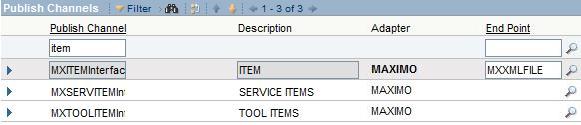
Save. To export using this interface, click on the ‘MXITEMInterface’ row and make sure it is highlighted and selected. Click on the “Data Export” button. A dialog box opens and you should see two fields: Export Condition and Export Count. The latter is self explanatory, but the Export Condition is where you specify a where clause to select what ITEMS you want exported. You can enter “1=1” to export all the items in the database or you can enter:
itemnum=’12345′
Notice I didn’t type in “where”. It’s implied. Next, click on OK and wait for it to complete. Go to your global directory, in our case it’s “C:\ibm\SMP\maximo\mif-globaldir”. You should now see a bunch of new folders and one of them is ‘xmlfiles’. Open that and you should see an XML file name something like “EXTSYS1_MXITEMInterface_1243130872220611751.xml”. The numbers are irrelevant, it’s just a unique id, but you get the idea. You can then open it with IE.
Note: if you open this file with notepad, you will notice that the contents was written all on one line. This is by default because it’s better for optimization. In order to export data that is more readable, you have to make changes to the MXXMLFILE end point. Go to Integration -> End Points and open up MXXMLFILE. Set the PRETTYPRINT property to 1 and save. Try your export again.
That’s it. Really simple huh? Well, I hope you enjoyed this tutorial. Please leave a comment.



Hi, I would like to export a workflow from Maximo7.1. I would like to use MXWinterface to export the workflow, but this interface is not available. Can you share with me how to do this?
Thank you.
You can do this like you would with any other objects that don’t exist. You would create your own Object Structure definition for Workflow, then create an interface for the OS.
hey.can you pm nick skype ?
i have problem ,I config MIF maximo 7.1
i export file xml (INVOICE) ERROR
“BMXAA1581E – No object with name {0} setup in JNDI tree. Check JMS/JNDI setup in the server Admin Console”
HELP ME
Hi, I am facing some issue to export output xml file on to another server and getting error message Access denied even l have given full acess to destination folder.
Can any one help me this, also let me know how to specify destination folder path in Global directly or End points ..
currenly l have written like 17.12.13.99d$xml_out or 17.12.13.99d:xml_out
Thanks in advance..
For me to get the ITEM xml files to write out to the MIF-Global Directory I had to:
– Goto > System Configuration > Platform Configuration > Cron Task Setup
– Select the JMSQSEQCONSUMER Cron Task
– Set the SEQQOUT Cron Task Instance to Active
– Save
Once I’d implemented these steps I was able to export XML files.
For some particular reason, I only see an axis2 folder and a schema folder in the directory I created. I also set up the crontask suggested by Garrett. When I checked the message tracking application and it says that the file has been published successfully but I don’t know were it went.LOL. Any idea Chon?
Not really sure. Double check your global directory and the end point.
I did by what you say, but occurs BMXAA1581E – JNDI don’t set up name {0} object like this
why?
How can Import /Export the data using “JMS Handler” as endpoint .Can you give the steps for creating data through JMS Handler in (MIF) Maximo 7 interface
Advanced Thanks
Shankar K
Hi,
Can you give the steps for creating data through JMS Handler?
Shankar K
You have to create a new endpoint and set the handler to JMS. Then you would have to configure the parameters for the external system. I haven’t used the JMS handler but it should be just like the other handlers such as XML and FLAT files.
Thanks. One more question how can configure the conditional properties in application designer for hidden/change the label name etc.
Advance thanks
Shankar K
After entering the mif-globaldir for mxe.int.globaldir, make sure you complete the following actions:
1. save
2. select check box for mxe.int.globaldir property
3. Select Actiontion –> Live Refresh
Hi,
Can anyone please let me know how to export data to an excel sheet ? Any suggestions would be appreciated. Thanks in Advance
Dimetri
Chon…could you please help me out in finding a solution to export data to an excel sheet ? Thanks in advance
@dimetri, You can’t directly export to an excel file (.xls or .xlsx), but you can export to a flat file. This flat file is really a .csv file. You can then import this .csv file into excel. You can follow this tutorial but just change the endpoints to MXFLATFILE. Hope this helps…
Hi chon,
i exported data from publish channels for item and asset, now problem is when i m going to export more data for any other publish channels(like labor or craft) i cant see it in mif-globaldir
what could be the problem?
many thanks
janhavi
Did you enable those channels in the external system?
yes i enabled them, even i created new external system n tried it but still same problem.
I followed the same steps and yet could not see the files generated.
Hi Chon,
Is it possible to export a workflow using MIF to an XML file? Cause I can’t find on Object Structure for workflows (there’s only one, which is consumed by the Migration Manager).
Thanks!
I think you might be able to create your own object. I’m not sure though
So… I guess the “common” way to do it should be through Migration Manager right?
I need to send an XML for CI object, when it gets updated or new record is created. To be more specific all the new records and the updated records should form into one single xml and should be exported on a daily basis.
Chon,
I paid for my yearly registration on your site 3 days ago but am still not able to be granted access. Please advise. My username is swissjura. I need to find some useful info on how to migrate/move existing location and its hierarchies in Maximo 7 from one site to another site. I know your input would be very useful and thats why I paid for the subscription.
hey.can you pm nick sky,yahoo ?
i problem want you help me?
my sky : manhfpt_fis yahoo : nguyendinhmanh90
We have a requirement to read the data from IBM’s Maximo Software using Datastage as an ETL tool. please could you help what would be the easy and cost effective way in fetching the Maximo data in to the Datastage and process it.
To my mind I have following options but sure which one works or best suits my requirement:
Option 1: Web service
Option 2: Extract an XML file from Maximo and use that as source
Option 3: Find if any ODBC connector will establish a connect to Maximo and fetch the require data.
Option 4: Create a csv file from Maximo and read from Datastage
Please suggest which option is practically possible and can be used as good solution.
Regards,
Ananth
Hi, did you get solution to this